Character Consistency In The Latest Image Models: Nano Banana 2 And GPT Image 2
FLB Studio
May 14, 20267 min read

The first half of 2026 has been the most disruptive six months for AI image generation in years. Two model launches in particular, Google's Nano Banana 2 (released February 2026) and OpenAI's GPT Image 2 (released April 21, 2026), pushed character consistency from "occasionally works if you tune the prompts" into "reliably works across batches". For anyone running a recurring AI character on social media, this is the difference between spending an evening fighting drift and getting a week of posts in one sitting. This piece looks at what each model actually delivers, what is still hard, and how the new baseline shapes the practical workflow.
Nano Banana 2 is built on Gemini 3.1 Flash Image and ships as a faster, cheaper successor to Nano Banana Pro. The headline capability for character workflows is that it can preserve resemblance for up to five distinct characters and the fidelity of up to fourteen reference objects in a single workflow. That is a meaningful jump for anyone whose feed depends on a recurring face plus a product, a wardrobe item, and a location, all anchored to real reference images. It is also faster (roughly two times) and cheaper (3 credits versus 12 on the Pro tier) than its predecessor, with 4K output available at Flash speeds. Nano Banana Pro, built on Gemini 3 Pro Image, remains the model most teams reach for when generations are going downstream into video or detailed editing, because the tighter consistency reduces frame-to-frame surprises.

GPT Image 2 arrived in April with a different headline: native multi-image batching. With its Thinking mode enabled, it generates up to eight coherent images from a single prompt while maintaining character and object continuity across the full set. That is exactly what a content batch session looks like in practice (one face, one outfit, eight variations of scene or angle), and the model now handles it without the third-pass refinement loops that used to be the norm. The catch is that Thinking mode is restricted to paid tiers (Plus, Pro, Business, Enterprise), so the strongest capability sits behind a subscription. Faces remain stable across edits and style transfers, which is the second consistency battle most character workflows lose.

For someone running an AI character brand, the practical impact is that the bottleneck has moved up the stack. You no longer spend the bulk of your session prompting around drift; you spend it deciding what scenes to generate. Reference-set workflows that used to require careful seeding now run cleanly: a frontal pose, four canonical angles, a recurring wardrobe item, and a product photo can be loaded once and reused across an entire month of content. Multi-character scenes (your AI character standing next to a real customer photo, for example) are now feasible in a single pass rather than two stitched generations. The work that used to take a Saturday afternoon now fits in an hour.
There are still limits worth flagging. Macro-level text on labels still drifts more than other elements, so a brand whose product depends on legible packaging should always render the label from a real photo and treat the AI image as the scene around it. Skin texture defaults toward over-smoothed unless you specifically prompt for natural pores and slight imperfection, which matters disproportionately for skincare and lifestyle creators. And both models still hallucinate the occasional six-fingered hand or extra earring on close inspection, so review before publishing is still mandatory. None of this is new. It is just where the remaining drift now lives.
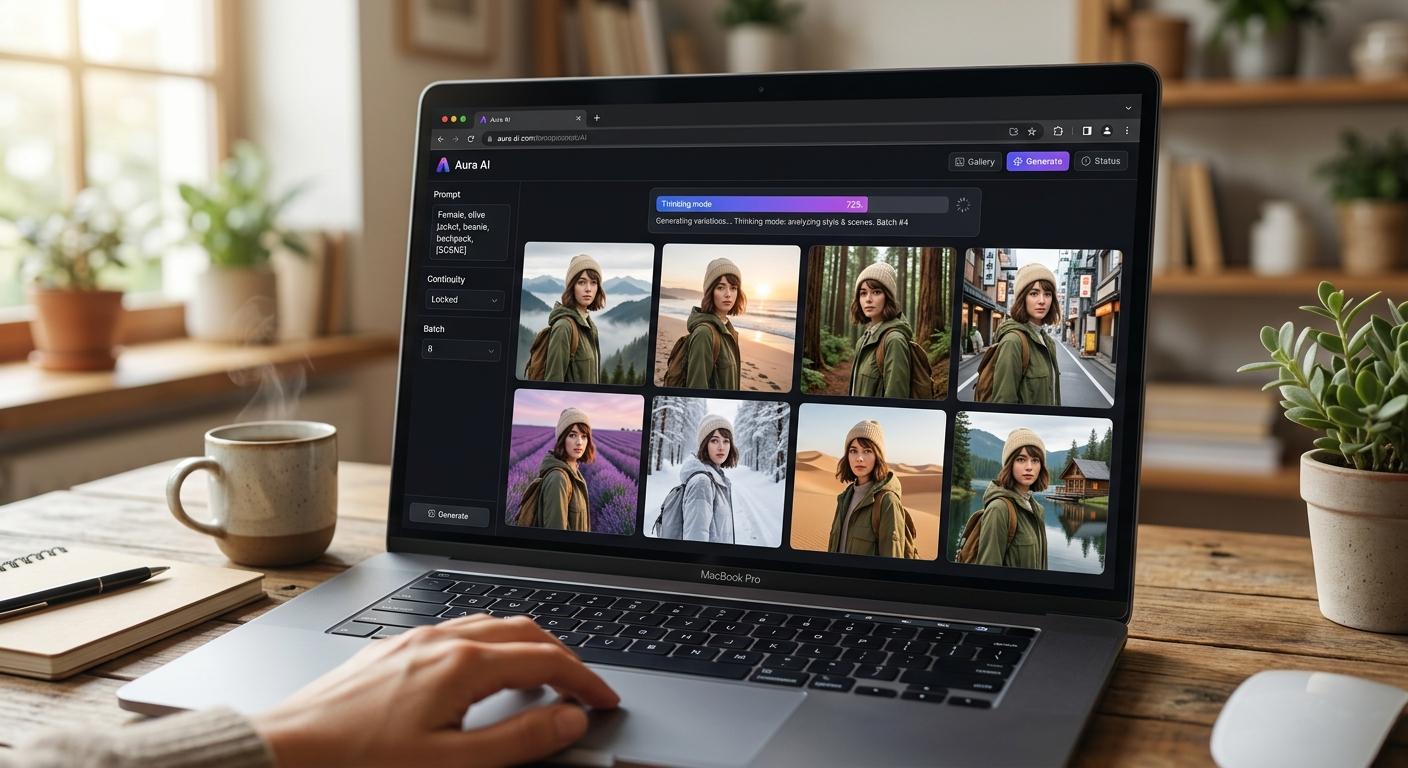
Flying Bears Talent sits on top of these advances. The platform handles the reference-set scaffolding (frontal pose, four canonical angles, wardrobe items, product images, location grounding) so the new model capabilities are exposed as a workflow rather than a prompt-engineering project. A short overview of how it wires those primitives together is on the Flying Bears Talent.AI landing page, and how it positions against single-model alternatives is on our comparison page. For teams ready to put the new consistency to work at a serious cadence, our monthly plans and credit packs line up credit allowances with that volume.